
Have you ever opened a brand new chat with Claude and found yourself explaining, ALL over again, who you are, what you do and how you like things written? Same. Howdy fellow readers, or shall I say, hopefully my new besties, this one's for you :)
The short version: Claude can remember you. Check one setting and tell it a few things on purpose, and you're sorted. For the bigger stuff, there's a second fix, and I'll show you both.
Like everyone else, I started off asking AI simple questions I could have asked Google, or why I dreamt I'd won the lottery and was living the best life... hoping it would tell me to quickly buy a ticket because that was a sign! 🤑 Then I kept seeing how much more productive it could make you, and who doesn't want that?
So I started brainstorming with it. I can't tell you a single one of those ideas, but I'm human, so it was probably something like how to make £100,000 in 3 months. We made a really good team. ONLY in that chat.
A few weeks later, in a new chat, I thought: this would go perfectly with our £100,000 plan, let's bring that back in! So I asked, and got: "I don't know what you're talking about, we haven't spoken about that." Cue me sifting through 100 old chats trying to find it, because I KNOW we had that conversation. In the end, I gave up, let the AI win, and repeated what I could remember.
Frustrated. Annoyed. Confused.
Was my AI broken? Did we not have the bond I thought we did? Was I being gaslit? Turns out it wasn't broken at all. It just needed a bit of help to remember. Fixing one setting was step one. Step two, giving it a proper second brain, is why it now keeps up with my thoughts hopping from one idea to the next, and we get along so much better!
So here are both, in order: the quick setting first, then an honest look at where it falls short and what I do instead.
What "Claude memories" actually are
There are two different things here, and they're so easy to mix up, so let's clear that up first.
Memory is like Claude's little notebook about you. As you chat, it jots down things like your work, how you like your answers and the projects you mention, and then it reads them back at the start of every new chat, so you're not starting from zero every single time.
Chat search is different. It lets Claude look back through your old conversations when you ask it to, like "What did we decide about my prices last week?"
Memory is switched on by default on the Free, Pro and Max plans. Chat search is only on the paid plans (Pro, Max, Team and Enterprise). And if you use Claude through work, your company decides whether you can use memory at all.
How to turn on Claude's memory (two minutes, I promise!)
Open Claude and go to Settings, then Memory.
Make sure Generate memory from chats is switched on.
On a paid plan? Switch on Search and reference chats too.
Have a little nosy under Topics. This is everything Claude currently remembers about you, and you can click on any of them to read it.
If anything's wrong, edit it. If there's something you'd rather it forgot, delete it. Easy!
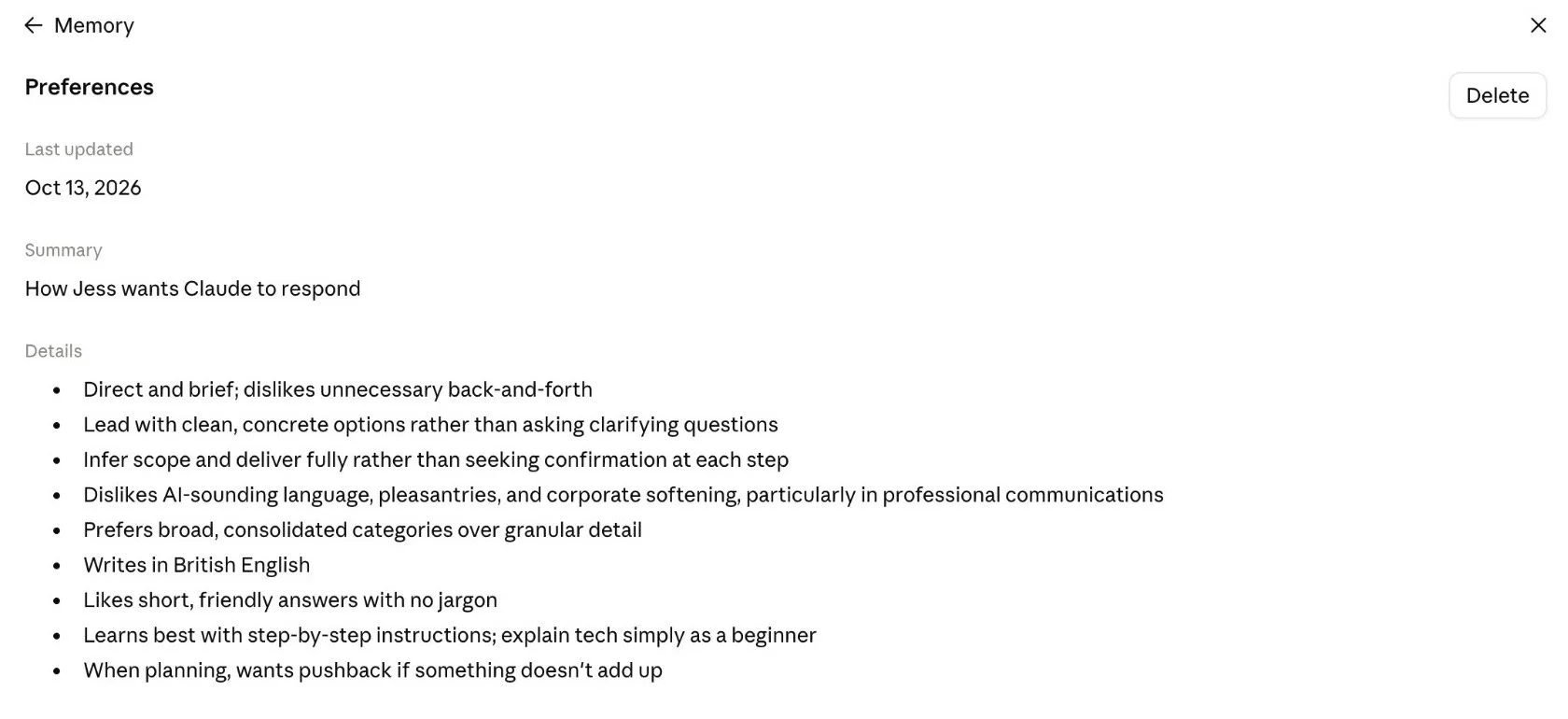
If you still have the older version of memory, look under Settings, then Capabilities instead. The steps are exactly the same.
How to make Claude remember you on purpose
Claude does pick things up by itself, but honestly, it's SO much better when you just tell it. In any chat, try something like this:
Remember this: I run a small online business selling digital planners. I write in British English. I like short, friendly answers with no jargon.
And if you change your mind, that's fine too: "Forget that I work in retail, I've left that job."
Sometimes Claude picks up on a silly little brainstorm and thinks it's the truth. Then I'll ask, "What about this idea?" and it says, "That doesn't really work for you. You've already got six full-time jobs." So I have to go back and explain that it was just an idea: "I only work on my small business. I'm not a pet groomer, and I don't have a dog walking business!" It can be a little annoying, I must admit, but it's so much better than Claude not remembering anything you've said.
A few things worth knowing before you go wild telling it EVERYTHING:
Health, politics, religion and a few other personal things stay out of its memory, unless you switch on "Include sensitive topics in memory" on the same page.
Some things it never saves at all, like government ID numbers and financial account numbers. Good!
Deleting a chat doesn't delete what Claude learned from it. If you want something gone, delete it from Topics.
Projects keep their own memory, separate from everything else, which is really handy if you have a work side and a personal side (like me!).
Want a chat it won't remember? Use an incognito chat.
Where Claude's memory falls short
Now, I said I'd be honest about the not-so-great bits too, so here goes. For everyday chats, the built-in memory is really helpful, but after a while I kept bumping into the same three things:
It's Claude's version of you, not yours. It decides what's worth keeping, and it keeps it short.
It only lives inside Claude. If you use ChatGPT as well, or you ever switch, you're starting again from scratch. (There is an import and export option, but it's still marked as experimental.)
It's not made for detail. Your full price list, your client notes, the way you write an email, the steps you go through every Monday... that's far too much for a few memory topics.
What I do instead: give Claude a second brain
These days, I keep a simple folder of notes on my own computer, in a free app called Obsidian, and Claude reads it before it helps me. People call this an "AI second brain", which sounds MUCH fancier than it actually is, trust me.
It holds everything: who I am, how I write, my businesses, my to-do list and the decisions I've made. At the start of each chat, Claude reads the notes it needs and saves new things as we go. And because the notes belong to me, nothing gets lost if I ever change apps, and I can open and edit them just like any other document.
Where this really shines for me is with clients. I keep notes on each one, so when I ask Claude about them, it knows exactly who I mean: what I charge them, how much work I've done for them, and what I need to do next. (A quick word on privacy: Claude reads these notes when it uses them, so I only keep what I'm happy for it to see, and never passwords or bank details.)
When I finish a piece of work, Claude saves that in the right folder too, all organised, so it can find it again later instead of me sifting through files myself. I find this most useful on video calls: I can quickly ask Claude for what I need to know there and then, rather than hunting for it.
It honestly saves me so much time. It's exactly what everyone meant when they said AI could make you so much more productive.
I know, I know, it sounds technical, but there's honestly no coding involved. You copy a ready-made folder, paste in one set of instructions and start chatting. That's it!
I now have my very own AI assistant, and I call him Mr Lemon. (Claude is an "it", but Mr Lemon is definitely a "he".) I'm sure you'll hear a lot more about him as we go along!

Where to start
If you just want Claude to know you a little better, set up memory using the steps above, then grab my free About Me Prompt. You answer a few questions, paste the result into Claude, and it knows the basics from day one.
If you want Claude to remember everything, properly, my guide Build Your Personal AI Assistant walks you through the whole second-brain setup, step by step. It's written for complete beginners, so please don't worry if you've never done anything like this before.
Either way, you really shouldn't have to introduce yourself to your own assistant every morning! Go and have a look at what Claude already remembers about you... you might be surprised. And let me know what you find, I'd love to hear :)
Speak soon,
Jess
